GGUF Loader

๐ŸŽ‰ NEW: Agentic Mode Now Available! Transform your local AI into an autonomous coding assistant.

Run popular open-source AI models like Mistral, LLaMA, and DeepSeek on Windows, macOS, or Linux. No Python, no command line, and no internet required. Just click and run. Now with Agentic Mode for autonomous file management and coding tasks.

๐ŸŽ‰ What's New in v2.1.2

Released August 7, 2026 ยท Cross-platform floating chat fixes and a brand-new one-click Linux installer.

๐Ÿง One-Click Linux Installer

A new .tar.gz package with an installer that adds a desktop menu entry โ€” no admin rights, no dependencies, no Python.

โฌ‡๏ธ Get the Linux installer

๐Ÿ’ฌ Floating Chat Fixes

The floating chat button no longer disappears when switching apps on macOS, can't get stuck minimized, and stays clear of taskbars, docks, and menu bars on every OS.

โš™๏ธ Automated Release Builds

Every release now automatically builds and attaches Windows and Linux installers via GitHub Actions โ€” downloads are always up to date.

View all releases โ†’

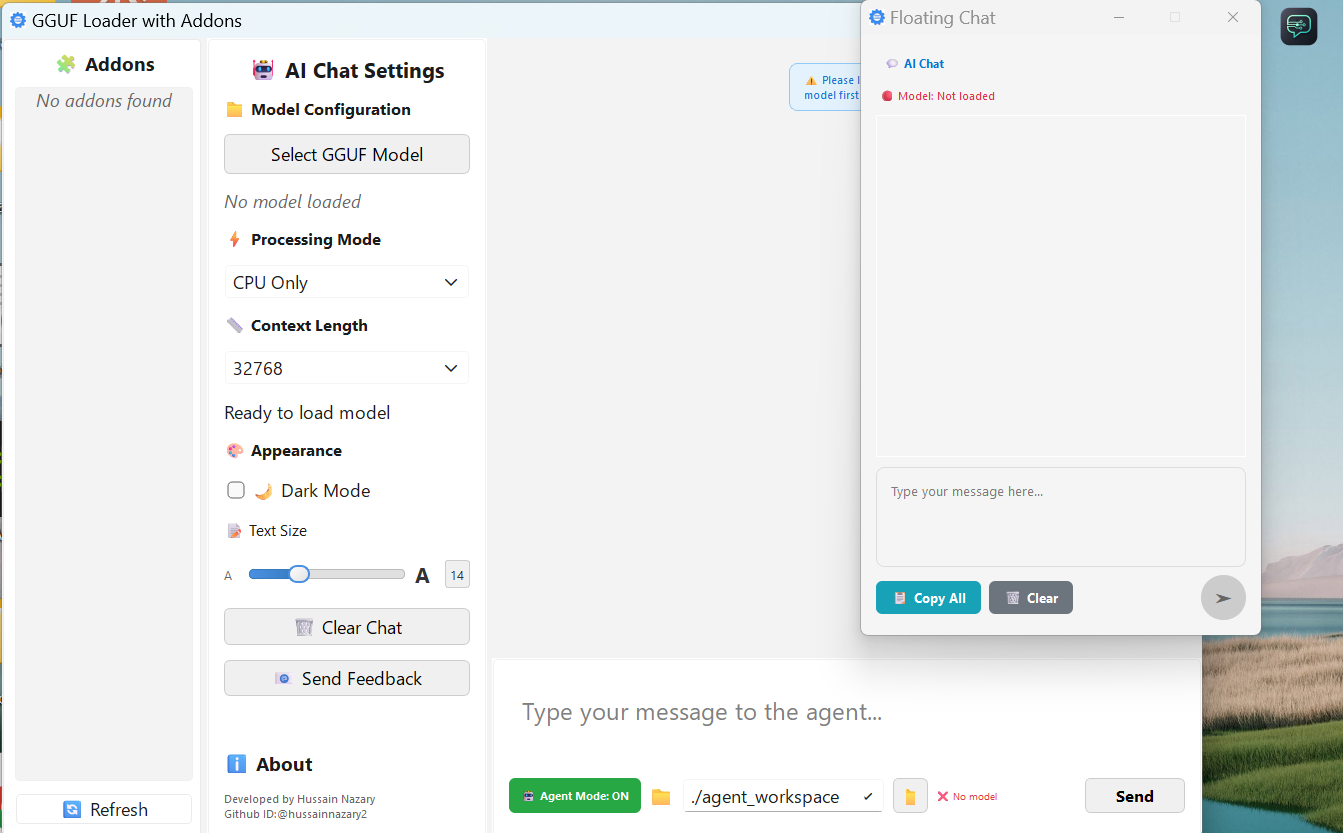
GGUF Loader Interface

GGUF Loader application interface showing the main window with model loading and chat features
๐Ÿš€ Now Available

Introducing Lawyer Assistant โ€” Free, On-Device Legal AI

We're excited to announce the launch of Lawyer Assistant, a new addition to the local AI ecosystem. Ask questions about your contracts in plain English and get answers with exact page numbers cited from your own documents โ€” nothing leaves your machine and it works fully offline, so it fits right alongside GGUF Loader's privacy-first approach.

๐Ÿ“„ Cited Answers

Ask in plain English and get answers with exact page numbers from your own contracts โ€” no vague citations, no guessing.

๐Ÿ”’ 100% Private

Runs entirely on your machine. Contracts, briefs, and research never leave your PC โ€” protecting attorney-client privilege.

โœˆ๏ธ Works Offline

No internet required. Use it anywhere โ€” in the office, in court, or on the road โ€” with no subscription and no data limits.

โš–๏ธ Built for Legal Teams

Hybrid search with reranking, compliance playbook scanning, and verification built in โ€” designed for lawyers, not general chatbots.

โ†“ The Interface in Action โ†“

Lawyer Assistant user interface showing a legal research question about a contract with a cited answer and page number

Download GGUF Loader

macOS

Download ZIP and run with launch.sh script. No installation needed.

Download ZIP for macOS

Or install via pip:

pip install ggufloader

Linux

Prebuilt .tar.gz with one-click installer that adds a desktop menu entry. No dependencies needed.

Download GGUF Loader v2.1.2 for Linux

Extract and install with:

tar -xzf GGUFLoader_v2.1.2_linux_x86_64.tar.gz && cd GGUFLoader-v2.1.2-linux && ./install.sh

๐Ÿš€ Quick Start - Run from Source Code

New to this? No problem! Follow these simple steps:

Step 1: Download the Code

  1. Click the button below to open GitHub
  2. Look for the green "Code" button
  3. Click it and select "Download ZIP"
  4. Save the ZIP file to your computer
๐Ÿ“ฅ Open GitHub to Download

Step 2: Extract the Files

  1. Find the downloaded ZIP file
  2. Right-click on it
  3. Select "Extract All" (Windows) or double-click (Mac)
  4. Open the extracted gguf-loader folder

Step 3: Run the App

๐ŸชŸ Windows Users:

  1. Find run_gguf_loader.bat
  2. Double-click it to run

๐ŸŽ๐Ÿง Mac/Linux Users:

  1. Open Terminal in the folder
  2. Type: chmod +x run_gguf_loader.sh and press Enter
  3. Type: ./run_gguf_loader.sh and press Enter

๐ŸŽฎ After the App Opens:

  1. Click the "Load Model" button
  2. Browse and select your .gguf model file
  3. Wait for it to load (may take a minute)
  4. Start chatting with your AI! ๐ŸŽ‰

How to Use It

1. Download a Model

First, get a GGUF-format model. We recommend the Mistral 7B Instruct model to start.

2. Load the Model

Open GGUF Loader, click the 'Load Model' button, navigate to the folder where you saved the model, select the model file you downloaded, and click 'Open'.

3. Start Chatting

That's it! You can now chat with your local AI assistant, completely offline.

๐Ÿ“š Latest Blog Posts

Explore our guides and use cases for local AI automation

View All Blog Posts

Learn More

Features & Philosophy

Our Philosophy

AI should be accessible, private, and under your control. We believe in democratizing artificial intelligence by making powerful models run locally on any machine, without compromising your data privacy or requiring complex technical knowledge.

โ€” The GGUF Loader Team

Privacy First

Your data never leaves your machine. True offline AI processing.

Accessible to All

No complex setup. No Python knowledge required. Just click and run.

Your Control

Run AI models on your terms, your hardware, your schedule.

Core Features

๐Ÿค– Agentic Mode

Advanced reasoning and task automation with multi-step problem solving. AI can read, create, edit, and organize files autonomously in your workspace.

Multi-Model Support

Supports all major GGUF-format models including Mistral, LLaMA, DeepSeek, Gemma, and TinyLLaMA.

Fully Offline Operation

Zero external APIs or internet access needed. Works on air-gapped or disconnected systems.

User-Friendly Cross-Platform App

No command-line skills needed. Drag-and-drop GUI with intuitive model loading for Windows, MacOS, and Linux.

Optimized Performance

Built for speed and memory efficiency โ€” even on mid-range CPUs.

Privacy-Centric

All AI runs locally. Your data never leaves your machine. Compliant with GDPR.

Zero Configuration

Start instantly. No environment setup, Python, or packages to install.

Use Cases & How-To Guides

Use Cases

Business AI Assistants

Automate email replies, documents, or meeting notes without cloud exposure.

Secure Deployment

Use AI in Private, Sensitive, or Regulated Workspaces

Research & Testing

Run experiments locally with zero latency.

Compliance-First Industries

Ensure privacy and legal adherence with on-device AI.

How To Guides

How to Run Mistral 7B Locally

  1. Download Mistral 7B Instruct GGUF model from TheBloke's Hugging Face page.
  2. Open GGUF Loader and drag the model file into the app.
  3. Click "Start" to begin using Mistral locally.

How to Run DeepSeek Coder

  1. Visit Hugging Face and search for DeepSeek Coder in GGUF format.
  2. Download the model file to your computer.
  3. Open GGUF Loader, select the model, and launch your coding assistant.

How to Run TinyLLaMA on Low-End Devices

  1. Find a TinyLLaMA GGUF model with small context size.
  2. Use GGUF Loader to open the model file.
  3. Interact with the model even on laptops with 8GB RAM.
Model Downloads

Download GGUF Models

For a comprehensive collection of GGUF models, visit local-ai-zone.github.io

This website provides an extensive library of pre-converted GGUF models that are ready to use with GGUF Loader. The site features various models including Mistral, LLaMA, DeepSeek, and others in different quantization formats to match your hardware capabilities.

To download models from local-ai-zone:

  1. Visit https://local-ai-zone.github.io/
  2. Browse the available models catalog
  3. Select a model that fits your needs and hardware capabilities
  4. Choose the appropriate quantization level (Q4, Q5, Q6, etc.) based on your RAM and performance requirements
  5. Download the .gguf file to your computer
  6. Load the model into GGUF Loader by clicking the 'Load Model' button, navigating to the folder where you saved the model, selecting the model file you downloaded, and clicking 'Open'.

Alternatively, you can download models directly from this page:

Frequently Asked Questions

Frequently Asked Questions

What is GGUF Loader?

A local app that runs GGUF models offline. No Python, no internet, no setup.

Is it really offline?

Yes. All AI processes happen on your system with zero external requests.

Which models work?

Any GGUF model, including Mistral, LLaMA 2/3, DeepSeek, Gemma, and TinyLLaMA. See best models โ†’

Where can I find GGUF models?

Download from Hugging Face (TheBloke, bartowski) or official sources. Download guide โ†’

What platforms are supported?

Currently Windows, Linux, and macOS.

Testimonials & Addons

What Users Say

"GGUF Loader transformed how we deploy AI in our enterprise environment. The offline capability and Floating Chat have revolutionized our workflow productivity."

- Sarah Chen, CTO, TechFlow Solutions

"Finally, a solution that lets us run powerful AI models without compromising data privacy. The addon system is incredibly flexible for our custom integrations."

- Marcus Rodriguez, Lead Developer, FinSecure Analytics

"The ease of setup amazed me. From download to running Mistral 7B locally took less than 5 minutes. Perfect for researchers who need reliable, offline AI."

- Dr. Emily Watson, AI Research Scientist, University of Cambridge

Community Addons

Floating Chat

Always-on-top Messenger-style chat window connected to your locally loaded GGUF model. Drag the button anywhere and chat without switching apps.

Rating: โญโญโญโญโญ (2.1k reviews)

Data Analytics Suite

Advanced data analysis and visualization tools with AI-powered insights. Perfect for business intelligence and research.

Rating: โญโญโญโญโ˜† (890 reviews)

Security Scanner

AI-powered security analysis for code, documents, and system configurations. Enterprise-grade threat detection.

Rating: โญโญโญโญโญ (1.2k reviews)

Roadmap

GGUF Loader Development Roadmap

Our development roadmap includes several upcoming features and improvements:

  • Enhanced model management interface
  • Improved performance optimizations
  • Additional model format support
  • Advanced addon development tools
  • Enhanced cross-platform compatibility
  • Expanded documentation and tutorials
Contact

Contact Information

For support, feedback, or inquiries about GGUF Loader: