How Local AI Can Automate Insurance Tasks
Important: Consumer-Grade Hardware Focus
This guide focuses on consumer-grade GPUs and AI setups suitable for individuals and small teams. However, larger organizations with substantial budgets can deploy multi-GPU, TPU, or NPU clusters to run significantly more powerful local AI models that approach or match Claude AI-level intelligence. With enterprise-grade hardware infrastructure, local AI can deliver state-of-the-art performance while maintaining complete data privacy and control.
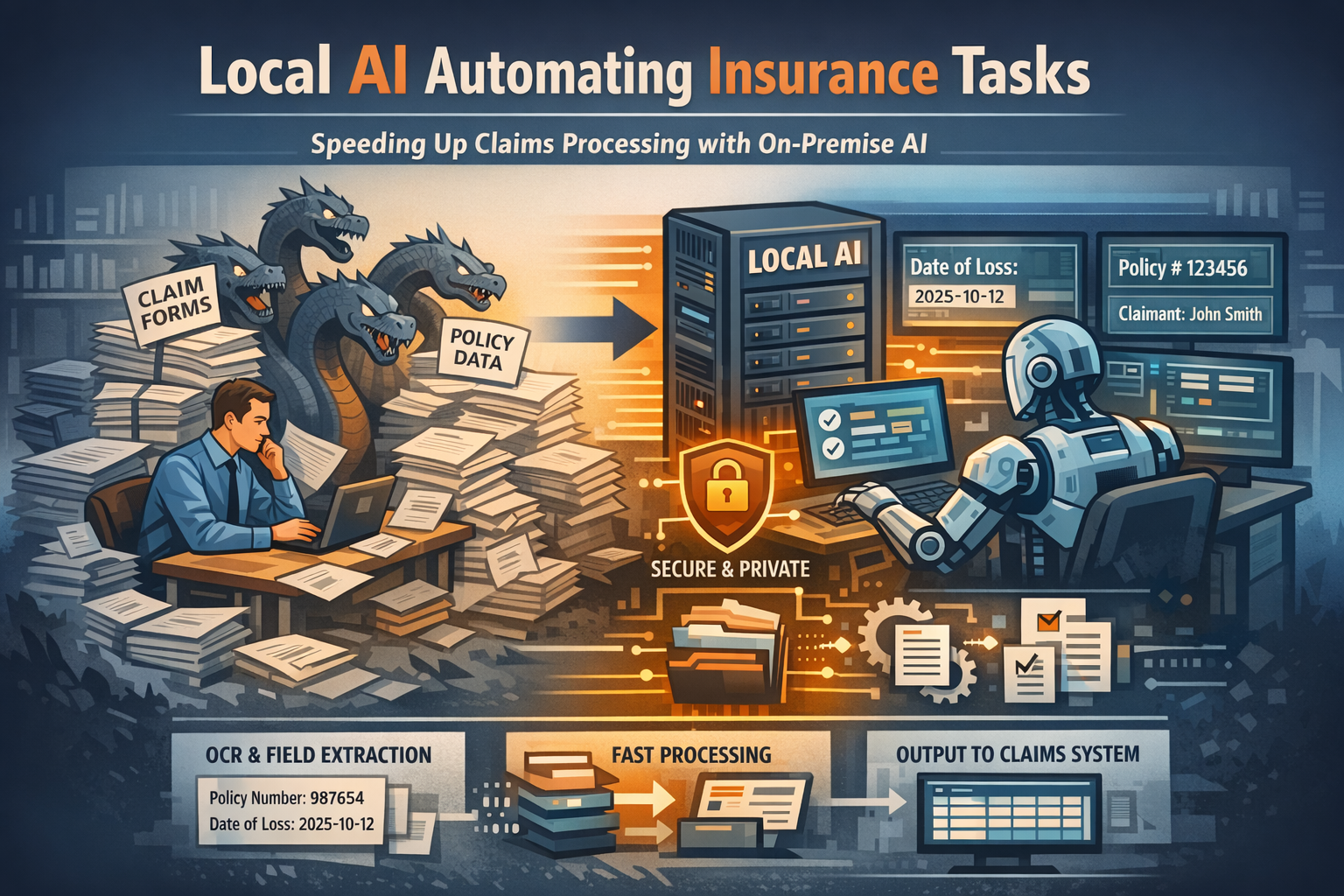
For insurance operations teams, processing claims and validating policies often feels like fighting a hydra: for every claim you settle, two more appear. The backlog isn't just about complex liability decisions or sensitive coverage disputes; it is frequently clogged with repetitive, rule-based data entry and document validation. Whether it's verifying thousands of policy renewals, extracting dates from scanned medical forms, or matching claim IDs to coverage limits, these "static" tasks consume hours of valuable adjuster and underwriter time.
These tasks share a common set of frustrations: they are high-volume, document-heavy, and unforgiving of human error. Yet, crucially, they require almost zero strategic judgment. You don't need years of underwriting experience to copy a policy number from a PDF to a database—you just need eyes and infinite patience.
This is exactly where Local AI thrives. Unlike general-purpose cloud chatbots that might try to "interpret" a policy clause or expose sensitive claimant data to third-party servers, local AI models (running privately on your own secure hardware) can be deployed as strict, deterministic engines. They don't "assess" risk; they simply process documents, extract fields, and format data with mechanical consistency.
Where AI Is Already Deployed in Insurance
Insurance is quietly one of the most aggressive AI adopters in financial services. Deloitte's Center for Financial Services finds that 76% of insurance organizations have deployed generative AI in at least one business function, and more than 90% of executives expect efficiency gains of 40-60% in targeted administrative workflows. Where is that AI working today?
- Claims automation and FNOL intake: Lemonade's "AI Jim" handles roughly 30-40% of incoming claims end-to-end, with some settled in seconds; on the enterprise side, Guidewire ClaimCenter and Duck Creek Claims embed AI intake, severity scoring, and straight-through processing for routine files.
- Auto damage and document review: Tractable's computer vision appraises more than $2 billion in vehicle repairs a year and feeds Duck Creek and Guidewire workflows, while CCC Intelligent Solutions and Verisk automate estimating and subrogation from photos and repair documents.
- Fraud detection: Shift Technology and similar specialists analyze claim histories to surface misrepresentation rings—typically identifying about twice the fraud of legacy rules-based systems, with industry-wide savings estimated at $80-160 billion over the next decade.
- Underwriting and policy administration: Generative AI digests unstructured submission emails and risk profiles, accelerates renewals, and drafts policy wording under compliance guardrails.
- Service chatbots: Tier-1 and tier-2 carriers run 24/7 chatbots for policy status, proof-of-insurance cards, and billing—with human-in-the-loop guardrails for disputes and complex changes.
Yet the same momentum stops at the perimeter: these deployments run inside large carriers with enterprise data agreements, and the tools are multi-tenant by design. The moment a claim file, medical bill, or rate table cannot leave the building, none of them apply.
Why These Tasks are "Static"
To understand where local AI fits, we must first define what makes an insurance task "static." A static task is one where the outcome is totally predictable and governed by fixed rules, regardless of the complexity of the document.
- Rule-Based: If a claim form lists "Date of Loss: 2025-10-12," that date is a fact, not an opinion. There is no ambiguity.
- Deterministic: The input (a scanned PDF, a handwritten form) should always yield the exact same output (a structured record, a validation flag).
- No Judgment Required: You aren't deciding if a claim is covered or how much to pay; you are simply recording what the claim data says.
Because these tasks rely on visual pattern recognition and strict data extraction rather than professional intuition, they are perfect candidates for automation.
Why Local AI Is the Right Fit for Insurance
Insurance is a regulated, explainability-first business—which is exactly why cloud AI hits a wall here. The industry's rules, secrecy requirements, remote adjuster reality, and per-claim economics each point the same direction: your own hardware.
- PHI, PII, and compliance: Health and disability claims contain Protected Health Information; sending it to a public cloud model requires strict Business Associate Agreements, data-residency guarantees, and zero-retention settings—and state insurance departments increasingly treat opaque AI as a compliance risk. Local AI keeps the entire claim file inside your own infrastructure.
- Rate and policy confidentiality: Underwriting guidelines, rating algorithms, and pricing models are trade secrets. They cannot be loaded into a multi-tenant service without risking intellectual-property leakage into a training corpus.
- Offline adjusters: Catastrophe (CAT) adjusters work in disaster zones with little or no connectivity. A cloud-dependent tool is dead weight there; a local model runs on a laptop or tablet with edge vision for damage assessment.
- Per-claim cost: High-volume, low-margin lines like personal auto cannot justify heavy cloud inference per document. Local AI runs for the fixed cost of hardware you already own.
The local payoff: a 7-13B GGUF model on a standard office server extracts fields from FNOL emails, medical bills, and police reports at 88-95% accuracy with zero per-claim fees—and every record stays inside the network where your state filings expect to find it.
What Local AI Actually Does (And What It Doesn't)
Local AI should be viewed as a tool for mechanical, deterministic actions. It assists the process but does not replace professional judgment.
Allowed Actions:
- Document Handling: Reading PDFs, handwritten forms, scanned images, and emails. It can "read" a crinkled accident report or a faxed medical form that traditional OCR might miss.
- Field Extraction: Pulling out specific, structured data points like Policy Number, Claim ID, Date of Loss, Insured Name, and Deductible Amount.
- Matching & Comparison: Comparing a claim's extracted data against a policy record to flag inconsistencies (e.g., "Claim date is outside policy period") or identifying duplicate claims.
- Classification: Categorizing documents by type (e.g., "Police Report," "Medical Invoice," "Estimate") or sorting incoming emails into "Urgent Claims" vs. "General Inquiries" based on keywords.
- Summarization (Non-Interpretive): Creating purely extractive summaries of claim descriptions or listing key facts (dates, locations, involved parties) from a narrative report.
- Formatting: Converting unstructured text (like an adjuster's field notes) into a structured JSON or CSV format ready for your claims management system.
What It Does NOT Do:
- Approve or deny claims.
- Assess liability or determine fault in an accident.
- Make underwriting decisions or price policies.
- Provide financial or legal advice to claimants.
Step-by-Step Workflow: Automating Claim Intake
Here is a practical, realistic workflow for using a local LLM to automate the initial intake and validation of high-volume claims documents.
1. Digitize and Prep
Gather your batch of incoming documents (PDFs, images). If they are scanned, use a local OCR tool or vision-enabled local model to convert them into raw text. High-quality text extraction is key to success.
2. Define the Schema
Create a strict prompt for the Local AI that defines exactly what you need. Do not ask it to "summarize the claim." Instead, command it:
"Extract the following fields from the document below into a strict JSON format: {"PolicyNumber": string, "DateOfLoss": "YYYY-MM-DD", "ClaimantName": string, "IncidentType": string}. If a field is missing, return null."
3. Batch Processing
Run a secure, local script (Python is standard) that iterates through your document folder. The script feeds each document's text into the local model with your prompt. Because it's local, you can process thousands of files overnight without API fees or data egress fees.
4. Validation Script
This is your safety net. Run a code-based validation script over the AI's JSON output.
- Does the "PolicyNumber" match the format of your active policies?
- Is "DateOfLoss" a valid date in the past?
- Is "ClaimantName" present?
Any record that fails these checks is flagged for manual review; valid records are passed to the next stage.
5. Formatting & Human Review
The valid data is converted into a standard format (CSV, XML) for your claims system. A claims processor opens this file, validates a random sample, and briefly reviews the flagged exceptions.
6. System Import
Once validated, the clean data—and the structured files—are imported directly into your Claims Management System (CMS). The manual data entry phase is effectively bypassed.
Realistic Example: The FNOL Bottleneck
Scenario: A regional auto insurer processes 500 First Notice of Loss (FNOL) emails and forms per week during storm season.
- Old Process: Three intake specialists spend 20 hours a week combined manually reading emails, typing data into the CMS, and assigning claims to adjusters.
- New Process with Local AI:
- A local batch process runs every hour, picking up new emails and PDF attachments.
- The AI successfully extracts and structures data for 460 of the 500 claims (92% automation).
- 40 claims are flagged as "unclear," "handwritten illegibly," or "missing policy number."
- The specialists spend just 2 hours reviewing the auto-processed batch and 1 hour handling the exceptions.
Result: The team saves 17 hours per week. Claims are assigned to adjusters hours faster, improving customer satisfaction. Specialists can focus on contacting distressed policyholders rather than typing data.
Limitations: When NOT to Use Local AI
It is critical to know your limits. Local AI is a powerful engine, but it acts without conscience or context. Do not use local AI for:
- Subjective Assessment: Determining if a driver was "negligent" based on a description. This is a legal and professional judgment.
- Coverage Disputes: Deciding if a specific, complex scenario falls under an exclusion clause.
- High-Value Decisions: Automatically approving payments or denying coverage. Automation stops at data entry and validation; the decision must remain human.
- Ambiguous Data: If a document is contradictory or unclear, the AI should be programmed to fail safely (flag it) rather than guess.
Key Takeaways
- Speed & Volume: Local AI excels at the "boring" work of reading, extracting, and formatting data from thousands of documents.
- Privacy Guaranteed: Processing sensitive claims data on your own hardware mitigates compliance and security risks.
- Assistance, Not Autopilot: The AI prepares the data for the human professional; it does not replace the underwriter or adjuster.
- Deterministic Output: Success relies on strict prompts, clear schemas, and rigid validation logic—not conversational "chat."
- The Claim File Stays In-House: Cloud AI handles straight-through processing only where data can legally leave the building—but the moment a claim touches PHI or a rate table, only local AI keeps the paper trail where HIPAA, state regulators, and your auditors expect it.
Local AI is best used as a deterministic assistant for high-volume, static insurance tasks where consistency, privacy, and volume matter more than judgment or reasoning.
Next Steps
Identify high-volume, repetitive tasks in your insurance operations:
- Are you manually entering claims data from PDFs or scanned forms?
- Do you spend hours extracting fields from FNOL emails or policy documents?
- Are you categorizing thousands of documents for claims processing?
- Do you need to validate policy numbers or coverage dates across large batches?
These are ideal candidates for local AI automation. Start with a small pilot project processing 100-200 claims to test accuracy and workflow integration before scaling to full production volumes.
For detailed implementation guides and model recommendations for insurance tasks, explore our technical documentation on local AI deployment in insurance environments.